
Hybrid work has changed what an office needs to do. It’s no longer just a place to sit and type it’s a hub where in-person and remote teams connect over video calls, where clients are welcomed into well-equipped meeting rooms, and where ideas move between screens, huddle spaces, and people. Getting that right takes more than a good Wi-Fi signal. It takes the right audio-visual technology conferencing cameras, displays, microphones, and collaboration tools installed in spaces designed to support it.
At M2 Office, we see this every day. Interiors and technology are too often treated as separate projects the furniture signed off with one supplier, the cameras, displays, and conferencing kit specified by another. When the two are planned together from the start, the results are dramatically better.
What is a hybrid meeting room?
A hybrid meeting room is any space designed to bring in-person and remote participants into the same conversation on equal footing. That means it’s built around video conferencing from the start with cameras, microphones, and displays positioned so remote attendees can see and hear everything as clearly as the people in the room.
The difference between a traditional conference room and a hybrid meeting room isn’t just the technology bolted to the wall. It’s the layout, the acoustics, the lighting, the furniture, and the power and data points all planned around the way people meet now. A well-designed boardroom or meeting space is as much about how remote participants experience it as how in-room attendees do.
What AV equipment do you need in a hybrid meeting room?
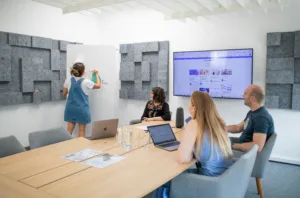
There’s no single spec that suits every business. The right AV kit depends on the size and purpose of the room and so does the furniture that goes with it. Below is what a typical setup looks like for each room type, and the products that bring it all together.
1.Huddle rooms (2–6 people)
Small, informal spaces for quick catchups and ad-hoc calls. Keep the AV simple:
- All-in-one video bar camera, microphone, and speaker in a single unit.
- A single 55″ commercial-grade display.
- Wireless presentation so anyone can share their screen.
On the interiors side, pair with a compact meeting table and collaborative furniture that suits drop-in use. If the huddle space sits inside a busy open-plan floor, a mid-sized acoustic pod like the Hush Meet works brilliantly as a drop-in four-person huddle room no build required.
2.Medium meeting rooms (7–12 people)
Your everyday team meeting and client presentation space:
- PTZ (pan-tilt-zoom) camera with AI auto-framing that tracks the speaker.
- Tabletop boundary microphones or a ceiling-mounted beamforming array for even pickup.
- Dual 65–75″ displays one for remote participants, one for shared content.
- Room controller for one-touch joins.
The room itself matters as much as the kit. A proper boardroom or meeting table with integrated cable management keeps power and data tidy, and the right meeting chairs keep people comfortable through longer sessions.
3.Large meeting rooms and boardrooms (12+ people)
The flagship space where big decisions happen and clients get a first impression:
- Multi-camera system with automatic speaker tracking.
- Ceiling microphone arrays to avoid table clutter.
- Distributed audio so remote voices are heard evenly across the room.
- 85″+ commercial displays, usually dual screen.
- Dedicated touch control panel on the table.
Bring it together with a bespoke boardroom table, executive seating, and acoustic wall treatments. For larger enclosed team meetings inside open-plan offices, the Silen Space Max acoustic pod seats up to eight with ISO-certified sound insulation a quicker, more flexible alternative to building out a new room.
How do you plan a hybrid meeting room fit out?
A good meeting room fit out follows a simple sequence:
- Walk every meeting space and ask how it’s used not how it was designed to be used. Most offices have too many large boardrooms and not enough huddle rooms.
- Pick a video platform standard (Teams, Zoom, Google Meet), work out who uses each space and for what, and decide how much of your workforce is hybrid.
- Acoustics, lighting, cable routing, and furniture all shape how the technology performs. Leave any of them until last and you’ll be compromising on the others.
- Choose modular, platform-agnostic AV that can be upgraded in stages, and furniture that can be reconfigured as teams evolve. Sit-stand desks like they Leap Electric Height Adjustable Desk are a good example they flex with different users and different ways of working without needing to be replaced.
- Splitting the AV contract from the fit-out contract is where most projects go wrong. Through our partnership with Ricoh,
- Europe’s largest AV integrator, M2 Office delivers the full AV stack alongside the furniture and fit-out one team, one timeline, one point of contact.
Ready to plan your next meeting room fit out? M2 Office brings AV and communications and office interiors together under one roof.
FAQs –
1. What makes a good meeting room?
A good meeting room works for how people meet with the right size for the group, comfortable furniture, good lighting and acoustics, and technology that’s easy to use. The best meeting rooms feel effortless: you walk in, start the meeting, and the space supports the conversation rather than getting in the way.
2. How many meeting rooms does an office need?
It depends on headcount and how your team works, but most offices benefit from a mix rather than all one type. A few small huddle rooms and phone booths for quick calls, one or two medium meeting rooms for team sessions, and a boardroom for larger meetings usually covers the bases better than two big rooms that sit half-empty.
3. What should you consider when designing a meeting room?
Start with how the room will be used team meetings, client presentations, training, or video calls then plan the technology, furniture, and acoustics around that. Lighting, cable management, and comfortable seating matter more than most people realise, especially for longer sessions.
4. Do I need the same video platform in every meeting room?
Standardising on one platform Teams, Zoom, or Google Meet makes meetings easier to join and kit easier to support. Certified hardware for your chosen platform means rooms work out of the box, and IT spends less time troubleshootin